

AI Translation Earbuds vs Translation Apps: Which Fits Your Trip?
Quick Decision: Earbuds and apps share one translation pipeline — the earbuds do not translate, the phone does. If your trip is mostly face-to-face conversation, earbuds give you private, hands-free translation. If you need to read menus, signs and labels, or keep a record of what was said, the app is the tool. Before either, check two things: whether your language pair is supported, and whether it works offline on your phone.
How this guide was researched: Every claim below comes from a maker page or an official support page checked on 18 November 2026 — Timekettle on its W4 Plus earbuds, Soundcore and Anker on how translation earbuds work, Google Translate support and the Google Play listing, and Apple support on Live Translation. LanPicks has not tested any earbuds or app for this guide, names no best product and lists no prices. Language counts change, so the numbers below are dated — check the maker’s page before your trip.
Contents
How both sides actually work
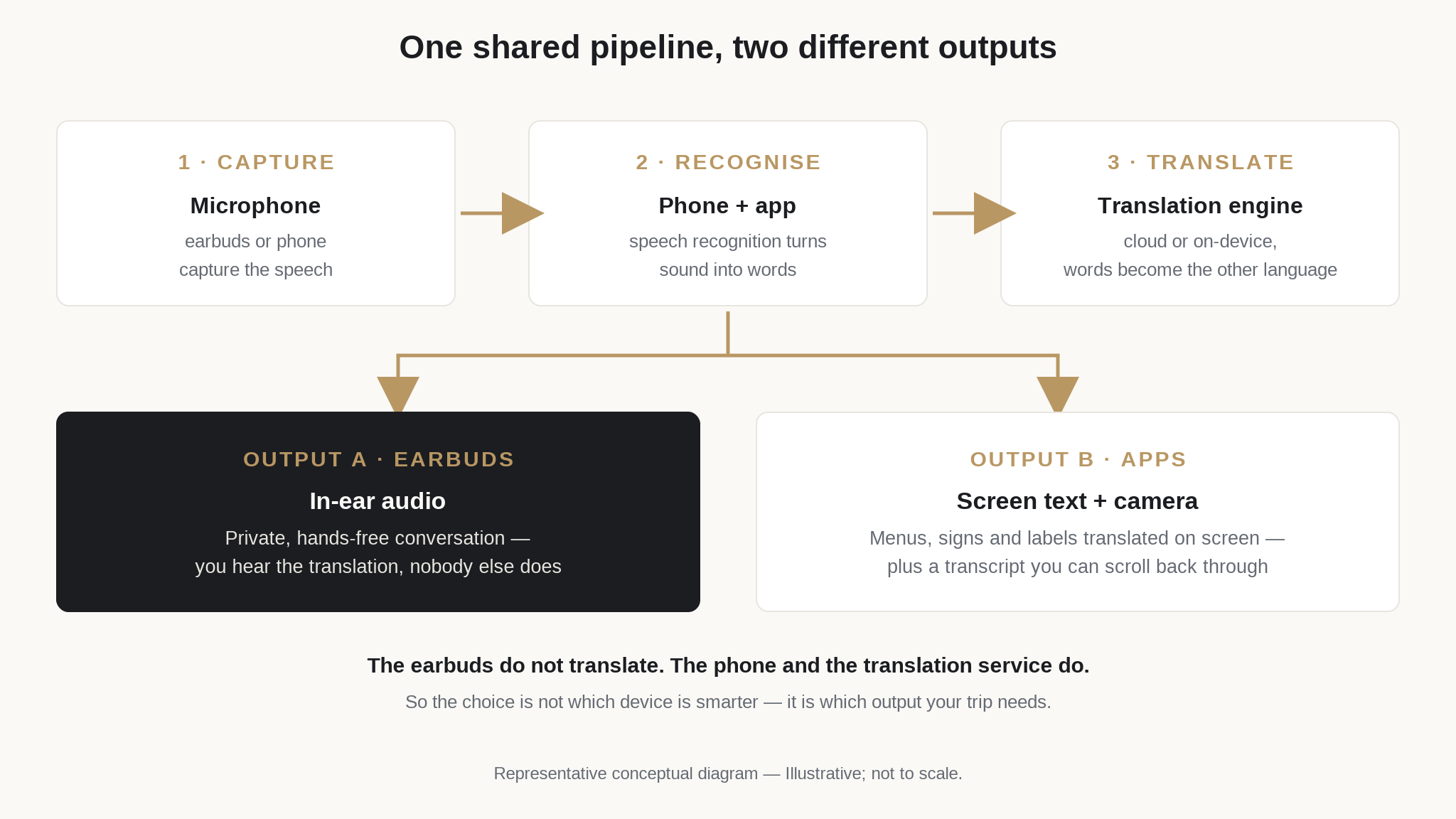
The first thing to understand is that translation earbuds and translation apps are not two different technologies. They are two different outputs for the same pipeline. Soundcore puts it plainly: for most translation earbuds, your phone does more of the listening than the earbuds do. The earbuds play the translation in your ear, while a companion app on your phone does the translating.
Anker describes the same pipeline in four steps: speech recognition, language processing, translation, and speech playback, with the functions running across the earbuds, a phone app and online services rather than entirely inside the earpieces. The microphone captures the speech, the phone recognises it, and a translation engine — in the cloud, or on the device — turns it into the other language. Then it comes back as sound in your ear, or as text on your screen.
That is why no dedicated translation earbud is a standalone translator. Most models require an internet connection for full real-time AI translation, in Soundcore’s words, and every one of them needs a phone and a companion app. The earbuds are the microphone and the speaker. The phone and the service do the work. Once you see the pipeline, the buying question changes: it is not which device is smarter, but which output your trip needs — sound in your ear, or text on a screen.
What only earbuds do
Earbuds do one thing an app cannot: put the translation in your ear, privately, while your hands and eyes stay free. In a face-to-face conversation, that is the whole point. You hear the other person in your language, you reply in yours, and nobody else hears either side. No screen to look at, no phone held between you, no reading aloud.
Timekettle’s W4 Plus shows how the earbud side is designed around that job. Its Listen and Play mode lets you hear translated speech in your earbuds, then reply through your phone speaker. Apple does the same thing two ways: when both people wear supported AirPods, each hears a translation in the language of their choice; if the other person has no AirPods, you speak naturally and use the Translate app on your iPhone to show your words or play back the translated audio.
That privacy has a limit worth stating. In-ear translation is private only while the conversation stays in your ears. The moment you need to show someone an address, a name or a written instruction, the earbuds have nothing to show — that is the app’s job, and it is the next section.
What only apps do
Apps do two things no earbud can, because earbuds have no camera and no screen. The first is reading text. Point the phone at a menu, a sign or a label and get a translated overlay — a job that needs a camera, which an earbud does not have. The second is keeping a record. You can show a phrase on screen, check an address later, or keep a transcript of a conversation to scroll back through. An earbud’s translation vanishes the moment it is spoken; an app’s transcript stays.
Google Translate shows how far the app side goes. Its Live translate works with or without headphones on your phone or tablet, and it offers three modes: Listening, Conversation, and Text only, plus a face-to-face split-screen. In Conversation mode, translations play out loud on your phone speakers or headphones while you take turns speaking, and the microphone automatically detects when one language stops and the other starts. That is a different tool from an earbud: it is built for two people looking at one phone.
The practical consequence is simple. A trip that is mostly talking — directions, small talk, a market stall — leans towards earbuds. A trip that is mostly reading — menus, timetables, street signs, forms — leans towards the app. Most trips are both, so the honest answer is usually both: earbuds for conversation, the app for everything written.
Online vs offline: the pre-trip check
Offline support is the check most buyers skip, and it decides whether the translation works on a plane, in a rural town or on a SIM-less phone. The rule is blunt: most models require an internet connection for full real-time translation. Some support limited offline translation once language packs are downloaded in advance, but accuracy and language coverage are reduced. Download the packs before you leave, not at the airport.
Google’s offline story shows how narrow the window can be. You can download languages for live translation offline — but Google’s own support page says the feature is currently only available for Pixel 9, 10 and 11 users. If your phone is not one of those, live translation needs a connection. The Play listing puts the offline figure at 59 languages, against 70 for conversations and 94 for camera translation.
Timekettle’s numbers show the same pattern. The W4 Plus offers 25 downloadable offline packs, and the maker says conversations stay seamless even when you are off the grid. Its handheld T1 supports 44 offline language pairs, and the smaller T1 Mini supports 13. Fewer pairs offline is the norm, not the exception — check yours specifically.
Apple’s Live Translation has the longest requirements list here, and all of them must be true at once: AirPods 4 with noise cancelling, AirPods 5 in either model, AirPods Pro 2, AirPods Pro 3 or AirPods Max 2; an iPhone 15 Pro or later; iOS 26 or later; Apple Intelligence turned on; Apple’s Translate app downloaded; and the latest AirPods firmware. If any one is missing, the feature is not there. Check the list against your own hardware before you count on it.
Language coverage: check your pair first
No translation tool covers every language, and the headline count is never the number that matters. What matters is whether your pair is on the list, in the mode you need, on your phone. Check the pair, not the total.
Google Translate is the widest net. Its June 2024 expansion added 110 languages, bringing typed-text translation to about 249 languages, and Google’s own Keyword blog says the total is close to 250. But the mode counts are smaller and they are the ones that decide your trip: 70 languages for conversations, 59 offline, 94 for camera translation, and 8 for live transcription. A language that works for typed text may not work for a live conversation, and one that works online may not work offline. Counts change, so check the app, not the headline.
Apple’s Live Translation is narrower. The Live Translation languages page lists nine languages in eleven regional versions: English in UK and US versions, French, German, Italian, Japanese, Korean, Mandarin Chinese in Simplified and Traditional versions, Portuguese from Brazil, and Spanish from Spain. The feature is still labelled Beta: it launched in September 2025 with five languages, and Italian, Japanese, Korean and Chinese arrived with iOS 26.1.
Timekettle’s W4 Plus sits between the two: 54 languages and 108 accents, with 25 downloadable offline packs. The pattern across all three is the same — the total is a marketing number, the pair list is the buying number. Before you buy anything, open the maker’s language list, find your pair, and check it in the exact mode you will use.
Accuracy and delay: what to expect
Translation earbuds are useful, and they are not interpreters. Accuracy is highest when people speak clearly in a quiet place, and drops with dialects, background noise, technical terms, or people talking over each other. Apple says the same thing in its own way: Live Translation uses generative models, and outputs may be inaccurate, unexpected, or offensive — check important information for accuracy.
Anker draws the line plainly: none of the models should be treated as a guaranteed substitute for a professional interpreter when accuracy is critical. Background noise, overlapping speakers, unfamiliar names, accents and connection quality can all affect the result. For directions, ordering food and small talk, earbuds and apps are fine. For a medical consultation, a legal discussion or a contract, they are not the tool, and no accuracy percentage on a box changes that.
Delay is the other half of the experience, and it is rarely printed on the box. Independent testing puts cloud earbuds at roughly 1 to 3 seconds from speech to translated audio: under 2 seconds feels like a slight pause, over 3 seconds like a broken phone call. One independent test of the Timekettle WT2 Edge measured up to about 3 seconds, with talking speed as one of the biggest factors in accuracy. No maker publishes a single latency figure, so treat any vendor latency claim as marketing, not a measurement.
Accuracy percentages deserve the same scepticism: one maker page flags its own accuracy figure as unverified, and a lab claim is not a field result. Judge a translation tool by whether your pair works, offline, in noise — not by a percentage.
Cost model: hardware, app, or both
The cost question has three answers, and they are not the same purchase. A phone app runs on the phone you already own: pair any headphones you already own and the free app will play translated speech into them, so you do not need translation hardware to get translated speech into your ears. A dedicated earbud is a hardware purchase, and some of them add a software cost on top.
Timekettle’s W4 Plus shows how the two models split. The one-time purchase version permanently unlocks all features with no recurring fees. The subscription version keeps two-person conversation and on-site listening free forever, while media translation, call translation and advanced AI features come with a 7-day free trial and then a monthly subscription. Older claims about the same maker — an old FAQ saying no subscription exists — are superseded by the current two-version model, so check the listing, not a review from last year.
Apple’s cost is hidden in the requirements list: Live Translation needs supported AirPods and an iPhone 15 Pro or later, so the price is the hardware you already own or would have to buy. There is no separate subscription for the feature itself. Compare total cost for your trip: the hardware, plus any subscription, for the modes you will actually use.
Privacy: where your voice goes
Cloud translation means your voice leaves your device. Cloud-based earbuds stream your audio to remote servers, process it there and return the translated audio — and the same is true of most phone apps in their online mode.
Makers answer the question in different ways. Timekettle states that conversations are fully encrypted, strictly compliant with GDPR and FERPA, processed through secure protocols, and never stored, never used for training, and never shared. Treat that as a maker claim, not an independent audit — it is what the maker states on its own page. For a medical consultation, a legal discussion or a supplier negotiation, the safer choice is an offline-capable model, or no earbuds at all. Check the privacy page before the trip, not after the conversation.
| What you need | Earbuds | Apps |
|---|---|---|
| Face-to-face conversation | Yes — private, hands-free, in-ear | Yes — out loud, or on screen |
| Reading menus, signs, labels | No — earbuds have no camera | Yes — camera translation |
| A record to check later | No — speech vanishes when spoken | Yes — saved text and transcripts |
| Working offline | Limited — download packs first; fewer pairs | Limited — depends on phone and language |
| Cost | Hardware, sometimes plus a subscription | On the phone you already own |
| Privacy | Voice goes to the cloud unless offline | Voice goes to the cloud unless offline |
Fit checklist before you travel
- Find your pair on the maker’s list. Not the total — your two languages, in the exact mode you will use: live conversation, offline, or camera.
- Test the offline mode at home. Download the language packs, switch the phone to airplane mode, and try a conversation. If it needs a connection, you will find out at home.
- Check the requirements against your hardware. Apple’s Live Translation needs specific AirPods and an iPhone 15 Pro or later; Google’s offline live translation needs a Pixel 9, 10 or 11.
- Try a noisy conversation. Accuracy drops with background noise, dialects and overlapping speech. If your trip is noisy, test in noise.
- Decide what you need to read. If the trip involves menus, signs and forms, you need the app’s camera — earbuds alone will not do it.
- Check the cost for your modes. Conversation may be free forever while media and call translation sit behind a subscription. Check the listing, not last year’s review.
- Pack for the pair. A 2L crossbody bag covers phone, wallet, keys and earbuds — see the Crossbody Bag Size Guide — and the earbuds, phone and charger travel together.
Conclusion
Earbuds and apps are not rivals. They are two outputs for one pipeline, and the trip decides which one you need. Conversation, in private, hands-free, belongs to the earbuds. Reading, and keeping a record, belongs to the app. Offline, your pair list and your hardware decide more than any feature list.
Next step: Everyday Carry Essentials: A Simple Guide for Men — its two-week test decides whether translation earbuds earn a place in your carry at all. If they do, the Crossbody Bag Size Guide shows where they ride.
FAQ
Do translation earbuds work without a phone?
No. The earbuds are the microphone and the speaker; the phone and its companion app do the translating, and most models need an internet connection for full real-time translation. Some support limited offline translation once language packs are downloaded in advance.
Can I use Google Translate with ordinary earbuds?
Yes. Pair any headphones you already own and the free app will play translated speech into them — you do not need translation hardware to get translated speech into your ears. Dedicated earbuds add private, hands-free conversation and modes like Listen and Play, not a different translation engine.
Which languages work offline?
Far fewer than work online, and it depends on the phone and the product. Google’s offline live translation is currently only available on Pixel 9, 10 and 11. Timekettle’s W4 Plus offers 25 downloadable offline packs. Check your pair, in offline mode, before you travel.
How accurate are translation earbuds?
Highest in quiet, clear speech, and lower with dialects, background noise, technical terms or people talking over each other — no published percentage is a reliable benchmark, so test your own language pair before you rely on it. For directions and small talk they are fine; for anything where accuracy is critical, they are not a substitute for a professional interpreter.
Do I need translation earbuds if I have the app?
Only if your trip is mostly face-to-face conversation and you want it private and hands-free. The app alone covers reading menus and signs, keeping a transcript, and — with any ordinary earbuds — hearing translated speech in your ear. Buy the earbuds for the conversation; keep the app for everything written.
Sources
- Google Translate Help — Live Translate (with or without headphones; Conversation mode; offline on Pixel 9, 10 and 11 only)
- Apple Support — Use Live Translation with AirPods (requirements; outputs may be inaccurate)
- Timekettle — W4 Plus AI Interpreter Earbuds (54 languages, 108 accents, 25 offline packs; Listen and Play; two cost versions)
- Google Play — Google Translate (108 text, 94 camera, 70 conversations, 59 offline, 8 transcribe)
- Soundcore — Do Translation Earbuds Work? (phone does the translating; internet required for full real-time translation)
- Anker — Do Translation Earbuds Work? (four-step pipeline; no substitute for a professional interpreter)
- LiveLingo — Translator Earbuds Review (cloud latency 1 to 3 seconds; audio sent to third-party servers)
- Live Translation — Languages (Apple’s nine Live Translation languages)
Related Posts
This guide covers one AliExpress listing: a 72-LED solar landscape spotlight, warm white, in the 1-piece variant. It is a buyer-check guide, not a hands-on review — LanPicks has not tested, owned, or measured this light. The direct answer is short: the listing states a solar-powered spotlight with 72 LED beads, a 1500mAh battery, 3.7 […]

This guide covers one AliExpress listing: a SHAHE stainless steel digital caliper, in the 0-150 mm (about 0-5.91 in) range variant. It is a buyer-check guide, not a hands-on review — LanPicks has not tested, owned, or measured with this caliper. The direct answer is short: the listing states a 0-150 mm stainless caliper with […]

This guide covers one AliExpress listing: a vintage racing leather watch strap, in the light brown, 18 mm (about 0.71 in) width variant. It is a buyer-check guide, not a hands-on review — LanPicks has not tested, owned, or measured this strap. The direct answer is short: the strap is a perforated leather racing-style band […]
This foldable LED desk lamp is a small, USB-charged task light: it folds flat for travel, stands on a desk for reading or bedside use, and its base holds a phone or tablet. The listing states touch control, stepless dimming, three light modes (cold, warm and mixed), a rechargeable battery, and a nominal voltage of […]

This retro-style CCD camera is a compact point-and-shoot that leans on its look: a pocketable body, a flip-style dual-camera setup, a flash, and SD-card storage. The listing states 4K video at 4096×2160, a 1/1.6-inch CCD sensor, and 2x to 7x optical zoom. It is a reasonable fit if you want a cheap, fun second camera […]