

Mechanical Keyboard Sizes Explained: 60%, 65%, 75%, TKL and Full Size
Shopping for a mechanical keyboard starts with a confusing wall of labels: 60%, 65%, 75%, TKL, full-size. They look like precise measurements, but they are not. They are rough shorthand for how many keys a layout keeps compared with a standard full-size board — and, more usefully, which groups of keys you give up.
Short answer: the percentages describe key count, not exact width. A full-size board has about 104 keys (US ANSI layout). A 60% board keeps about 61 of them. Most compact layouts drop key groups in a common pattern: the number pad goes first, then the navigation cluster, then the function row, then the dedicated arrow keys — but this is a trend among popular layouts, not a rule every design follows. Choose by the keys you actually press every day and the desk space you have — not by the percentage. If you want the function row and arrow keys while gaining real mouse room, a TKL or 75% board is the practical middle ground.
How this guide was put together: LanPicks did not test keyboards hands-on for this article. Key counts, widths and layout descriptions are based on published manufacturer layout guides, including Keychron’s keyboard size and layout buying guide, and cross-checked against editorial references. Widths are illustrative examples, not a universal standard — Keychron lists its 75% Q1 at 327.5 mm wide, while the table below shows about 320 mm for a typical 75% board — so check the exact model’s stated dimensions. The hero image is an AI-generated editorial illustration, not a photo of a real product. Our editorial policy explains how we research and write guides.
In this guide
Keyboard Size vs Physical Dimensions
A keyboard “size” is a family name, not a measurement. The percentage is a rough share of the keys on a standard 104-key full-size board (US ANSI layout). A 60% board has about 61 keys, and 61 out of 104 is 58.6% — the name is rounded marketing shorthand, not a precise physical measurement. A 65% board is not “5% bigger” than a 60% board in any way you would notice by looking at it.
Two boards with the same size label can also differ by a key or two. There is no governing standard for these labels, only convention. What you will see in most popular layouts is a common cutting pattern: the number pad goes first, then the navigation cluster is compressed or removed, then the function row, and only on the smallest boards do the dedicated arrow keys disappear. It is a trend, not a standard — individual designs vary.
Physical width follows the same rough pattern. The table below uses approximate widths for common ANSI layouts, compiled from Keychron’s layout guide and editorial references (DeskFinds, MechKeyReview). Treat them as illustrative examples, not a universal standard: individual models vary, sometimes by more than a centimetre, and different case designs change the footprint without changing the layout.
Swipe to compare all columns →
| Layout | Also called | Keys (approx.) | Width (approx.) | What it drops vs full-size |
|---|---|---|---|---|
| Full-size | 100% | 104 | 17.5 in (44.5 cm) | Nothing |
| TKL | 80%, tenkeyless | 87 | 14.0 in (35.5 cm) | Number pad |
| 75% | Compact TKL | 81–84 | 12.6 in (32 cm) | Number pad; compresses navigation cluster |
| 65% | Compact | 66–68 | 11.5 in (29 cm) | Number pad, function row |
| 60% | Mini | 61 | 11.0 in (28 cm) | Number pad, function row, navigation cluster, arrow keys |

Compare the Main Layouts
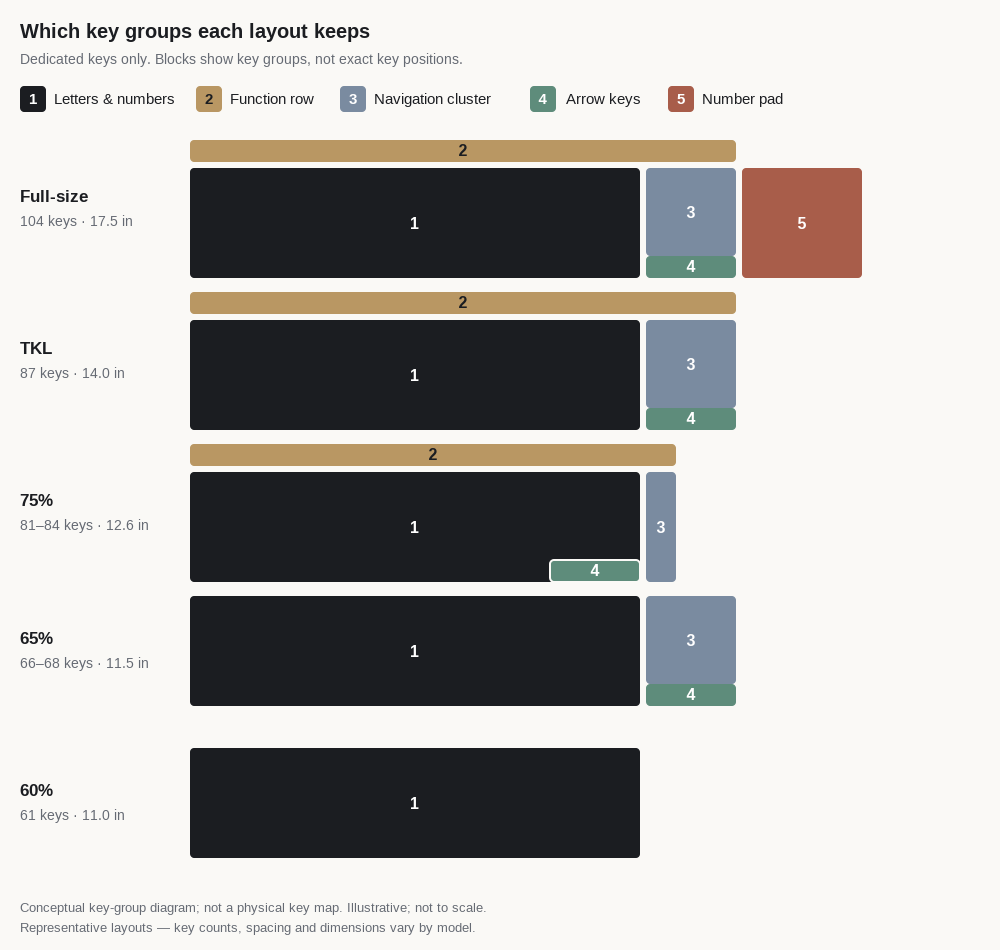
Full-size (100%): everything, everywhere
A full-size keyboard keeps every key group: the main alphanumeric block, the number row, the function row (F1–F12), the navigation cluster (Insert, Delete, Home, End, Page Up, Page Down), the arrow keys and the number pad. At about 104 keys in the US ANSI layout (105 in ISO), it is the only layout where nothing is missing, moved or hidden behind a function layer.
Choose it if you type numbers every day — accounting, data entry, spreadsheet-heavy work — or if you simply want every key immediately available and have the desk space. Its cost is width: at roughly 17.5 inches (44.5 cm), it pushes your mouse several inches further to the right, which matters more than most people expect during long sessions.
A related variant worth knowing is the 96% (also called 1800-compact) layout. It keeps the number pad and the function row but packs everything tighter, dropping a few navigation keys such as Print Screen, Scroll Lock or Pause. It is a niche option, not a separate mainstream size.
TKL (80%): the safe starting point
TKL stands for tenkeyless: a keyboard without the ten-key number pad. It removes the number pad and nothing else. You keep the function row, the full navigation cluster and the arrow keys, all in their usual positions, so there is nothing new to learn.
At about 87 keys and roughly 14 inches (35.5 cm) wide, a TKL brings your mouse about 3.5 inches (9 cm) closer than a full-size board, using the illustrative widths in the table above. The actual gain depends on the exact models and how you place them — the freed width is desk space gained, not a guaranteed shift in mouse position. It drops the least while gaining the most. If you value a familiar layout above saving desk space, and you do not live in spreadsheets, TKL is the default recommendation in this guide.
75%: compact without giving much up
A 75% board takes the TKL idea and tightens it. It keeps the function row and the arrow keys, but pulls the navigation keys directly into the main body of the board — usually a single column on the right edge (Delete, Page Up, Home, End, Page Down). Some 75% designs keep small gaps between key groups and others pack them tight with no gaps, so check the actual layout of the model you are considering. Key count lands around 81 to 84 keys, depending on the specific design.
Compared with the illustrative widths in the table above, you save roughly another 1.4 inches (3.6 cm) of width over a TKL, which is enough to notice on a small desk. The actual difference depends on the models you compare. The trade-off is spacing: keys sit closer together and the navigation cluster is compressed, so the layout takes a little getting used to. For many people this is the sweet spot — a compact board that still has dedicated arrow keys and a function row.
65%: a compact choice with dedicated arrows
At 65%, the function row disappears entirely. What remains is the alphanumeric block, dedicated arrow keys and a small strip of navigation keys along the right edge — usually Delete, Page Up and Page Down, sometimes Home and End. Key count ranges from about 66 to 68.
The function keys are not gone; they live on a second layer, reached by holding Fn and pressing the number row. That is fine if you rarely use F-keys, but it becomes friction if your daily work depends on them — shortcuts, media controls, or application commands. The 65% is a popular compact choice that keeps dedicated arrow keys, and that line matters: arrows you can find without looking are hard to give up once you rely on them.
60%: maximum desk space, maximum adjustment
A 60% board keeps only the main alphanumeric block and the modifier keys — about 61 keys. There is no function row, no navigation cluster and no dedicated arrow keys. Everything omitted lives on Fn layers: hold Fn and press another key.
The reward is the smallest common footprint, about 11 inches (28 cm) wide, with maximum mouse room and easy portability. The cost is relearning: arrows, Delete, Home and the F-keys all require layer combinations, which slows down text editing until the combinations become muscle memory. It suits minimalist desks, travel and competitive gaming setups where mouse space matters most — and it can frustrate people who edit text all day.
Retained and omitted keys at a glance
Swipe to compare all columns →
| Key group | Full-size | TKL | 75% | 65% | 60% |
|---|---|---|---|---|---|
| Alphanumeric block | Yes | Yes | Yes | Yes | Yes |
| Number row | Yes | Yes | Yes | Yes | Yes |
| Function row (F1–F12) | Yes | Yes | Yes | Fn layer | Fn layer |
| Navigation cluster | Yes | Yes | Partial | Partial | Fn layer |
| Arrow keys | Yes | Yes | Yes | Yes | Fn layer |
| Number pad | Yes | No | No | No | No |
Which Keys Do You Need
Forget the percentages for a moment and answer four questions about your own habits. Your answers point at a size more reliably than any label.
Do you type numbers for a living? If spreadsheets, accounting or data entry fill your day, keep the number pad: full-size, or a 96% board if you want it narrower. A separate USB number pad is a legitimate alternative if you only need one occasionally — it lets you use a compact board daily and pull the pad out when needed.
Do you use the function row daily? Shortcuts, application commands, media keys and gaming bindings often depend on F1–F12. If the answer is yes, stay at 75% or larger. At 65% and 60%, every F-key becomes a two-key combination.
Do you edit text with arrow and navigation keys? Writers, coders and anyone who moves through documents constantly should keep dedicated arrows. That rules out 60% and leaves 65% as a sensible compact option.
Do you game with low mouse sensitivity? Wide mouse sweeps benefit from every inch of desk space. Compact boards — 65%, 75% or TKL — move the mouse closer to your typing hand and free up room on the right.
If you answered “rarely” to all four, a 60% board will probably make you happy. If you answered “daily” to two or more, stay with TKL or larger.
Desk and Mouse Space
A keyboard’s width only matters relative to the desk it sits on. Before buying, measure the free width where the keyboard will sit, with your mouse in its usual spot and your monitor base in place. Then compare that number with the approximate widths in the table above, leaving at least a few inches for mouse movement. Our desk mat size guide shows how to measure before you choose a mat.
This is where compact boards earn their keep. Using the illustrative widths in the table above, moving from full-size to TKL frees about 3.5 inches (9 cm) of desk; going to 75% frees about 5 inches (12.5 cm). The real difference depends on the exact keyboards and where you place them. On a desk narrower than about 24 inches (60 cm), that difference can decide whether your mouse has room to move or constantly runs into the keyboard’s edge.
Keyboard size is one part of a clean setup, not the whole story. Cable routing, monitor placement and where the mouse actually travels matter just as much. Our guide to build a clean gaming desk setup on a budget walks through measuring your desk and planning the layout before buying anything.
ANSI and ISO Are Different Questions
Size and layout standard are two separate things, and mixing them up causes bad purchases. “ANSI” and “ISO” describe the physical arrangement of keys, not the size of the board.
- ANSI (US) is the standard most keyboards sold in the United States use: a wide horizontal Enter key, a long left Shift, and 104 keys on a full-size board.
- ISO (European) has a tall, L-shaped Enter key, an extra key next to the left Shift, and 105 keys on a full-size board.
A 75% board exists in both ANSI and ISO versions, and the size label tells you nothing about which one you are buying. Check the product’s layout standard separately — especially the Enter key shape — before ordering, because an ISO board feels different under your fingers if you learned to type on ANSI, and a keycap set made for one standard may not fit the other: the set needs the right sizes and shapes for the keys that differ, especially Enter and the left Shift. Some keys are the same size in both standards, so check the set’s compatibility list rather than assuming nothing fits.
Choose by Daily Tasks
Spreadsheets and number-heavy work: full-size. Nothing else keeps a dedicated number pad in its usual place, so if your numerical workflow benefits from one, full-size — or a separate pad — is the straightforward choice.
General typing, office work and mixed gaming: TKL or 75%. TKL if you want zero adjustment; 75% if your desk is tight and you are willing to learn a slightly compressed navigation cluster. When in doubt, decide by what matters more: pick TKL if you want the familiar layout with zero adjustment; pick 75% if saving desk space matters more and you are willing to learn a slightly compressed navigation cluster. See our 75% vs TKL keyboards guide for the full comparison. Both keep the F-keys and arrow keys for shortcuts and editing.
Competitive gaming and small desks: 65% or 60%. The 65% is the safer first step because the arrow keys stay dedicated. Go 60% only if you are comfortable living on Fn layers.
Travel and minimalist setups: 60%. Small, light and easy to pack — just be honest with yourself about how often you reach for arrow keys.
First mechanical keyboard, no strong preference: TKL. It changes the least about how you already type while giving you the core benefit of a compact board: a closer mouse and a tidier desk.
A short pre-purchase checklist:
- List the keys you press every day — number pad, F-row, arrows, navigation — and find the smallest layout that keeps them dedicated.
- Measure your desk’s free width with the mouse in place.
- Confirm the layout standard (ANSI or ISO) and the Enter key shape.
- Check the return policy before committing to a size you have never typed on.
FAQ
Is 75% better than TKL? Neither is objectively better. A 75% board is about 1.4 inches narrower than a TKL (using the illustrative widths in this guide) and keeps the function row and arrows, but compresses the navigation keys. A TKL keeps everything in its standard positions and is easier to adjust to. Choose 75% for a tight desk, TKL for zero learning curve.
Which size is best for a first mechanical keyboard? There is no published market ranking behind this guide, so we do not rank sizes by popularity. For a first keyboard, TKL is the safest starting point if you want a familiar layout, while 75% is the better pick if desk space is tight. Both keep the function row and arrow keys, so either works as a first board. Switches are a separate choice from size — see our linear vs tactile vs clicky switches guide.
Do I need a number pad? Only if you type numbers often. For occasional number entry, the number row above the letters is enough, and a separate USB number pad covers the rest without forcing you to use a full-size board every day.
Does keyboard size affect typing speed? Not directly. What affects speed is relearning: moving to a layout that hides keys you use on Fn layers slows you down until the new combinations become muscle memory. A layout that keeps your daily keys dedicated avoids that relearning cost.
Can I use a 60% keyboard for work? Yes, if your work rarely needs the function row, arrow keys or navigation cluster as dedicated keys. Writers and coders who navigate documents constantly often find 60% frustrating; people who mainly type prose and use a mouse for navigation adapt more easily.
Conclusion
Keyboard sizes are a trade, not a ranking. Every step down from full-size buys desk space and mouse room with keys you have to reach differently — or give up entirely. Start from the keys you press every day, measure your desk, and pick the smallest layout that keeps your daily keys dedicated. That often means a TKL or a 75% board; for number-heavy work it is full-size; for maximum desk space it is 65% or 60%.
If you are planning the desk around the keyboard, read our clean gaming desk setup guide next — it covers measuring your space and placing the keyboard, mouse and monitor before you buy anything.
Sources
- Keychron. “Keyboard Size Layout Buying Guide.” https://www.keychron.com/blogs/news/keyboard-size-layout-buying-guide
- Keychron. “Keychron Q1 QMK Custom Mechanical Keyboard — Version 2” (specifications: Length 327.5 mm). https://www.keychron.com/products/keychron-q1
- DeskFinds. “Keyboard Sizes Chart: Every Layout Measured.” https://www.deskfinds.com/guide/keyboard-size-chart
- MechKeyReview. “Keyboard Sizes Explained: 60%, 65%, 75%, TKL, Full-Size (2026).” https://mechkeyreview.com/blog/learn/keyboard-sizes-explained
- Keyboard Hunter. “Keyboard Size Guide: 60%, 65%, 75%, TKL & Full-Size.” https://keyboardhunter.com/keyboard-sizes/
- Key counts and approximate widths cross-checked against the sources above on 11 November 2026. Figures are illustrative examples compiled from these sources, not a universal standard; individual models vary.
Related Posts
This is a keycap set only: black keycaps, no keyboard and no switches. It is worth buying only if your board takes MX-style stems, uses an ANSI layout, and matches the key widths and rows in the set. Keychron describes the set as a full set of 141 keys; the AliExpress listing does not confirm […]

A gaming mouse that fits your hand disappears during play; one that does not keeps reminding you it is there. Fit comes down to two numbers — your hand length and width — and one habit — your grip. Measure both, compare them against the maker’s published dimensions, and use the starting ranges in this […]

AI-generated editorial illustration; not an exact product depiction. Quick Decision Pick a 2.4 GHz wireless mouse if you want no cable and play on a PC with a free USB port for the receiver. Pick wired if you never want to think about charging, or you are shopping on a tight budget. Use Bluetooth mainly […]

A mechanical keyboard switch is the mechanism under each key. Most common mechanical switches fall into one of three feel families — linear, tactile, or clicky — and the family is about what a keypress feels like under your finger. Force and travel are a separate decision: two switches in the same family can press […]

Both the 75% and the TKL drop the number pad, and both keep a function row and dedicated arrow keys. But they do not keep the same keys in the same way: a 75% usually keeps fewer dedicated navigation keys than a TKL, and how many it keeps — and where they sit — varies […]