

USB-C Charging Cables: Wattage, Device Compatibility and Safety Checks
USB-C is a connector shape, not a power level. Two cables that look identical can charge your laptop at full speed, cap it at 60W, or — in the worst documented cases — send the wrong voltage to your device. What decides it is a negotiation among three things: the charger, the cable, and the device. This guide covers the three checks that matter before you buy: the wattage the cable can actually carry, whether it matches your devices, and whether it is safe.
Buy the cable for the job, not the connector. For laptop charging, look for a reputable 100W or 240W USB-C cable with clear USB Power Delivery support. For docks, external SSDs and displays, buy a USB4 or Thunderbolt-rated cable with an explicit data-speed rating. For bedside phone charging, a soft 240W charging cable is fine even if it only does USB 2.0 data. If a listing says only “USB-C” and nothing else, it has told you nothing about what the cable can do.

Check the wattage first: the cable is the gate
USB Power Delivery is a negotiation: the charger offers, the device asks, and the cable has to survive the current. The vocabulary is small — a voltage from a fixed list, and a current up to the cable’s rating. Multiply them and you have the wattage on the box. Standard Power Range covers up to 100W at 20V and 5A; Extended Power Range, added in USB Power Delivery 3.1 in 2021, adds 28V, 36V and 48V at 5A for 140W, 180W and 240W.
| Cable power tier | Max voltage and current | E-marker chip | Typical devices |
|---|---|---|---|
| 60W Standard | Up to 20V × 3A (60W) | No | Phones, tablets, small laptops up to 60W |
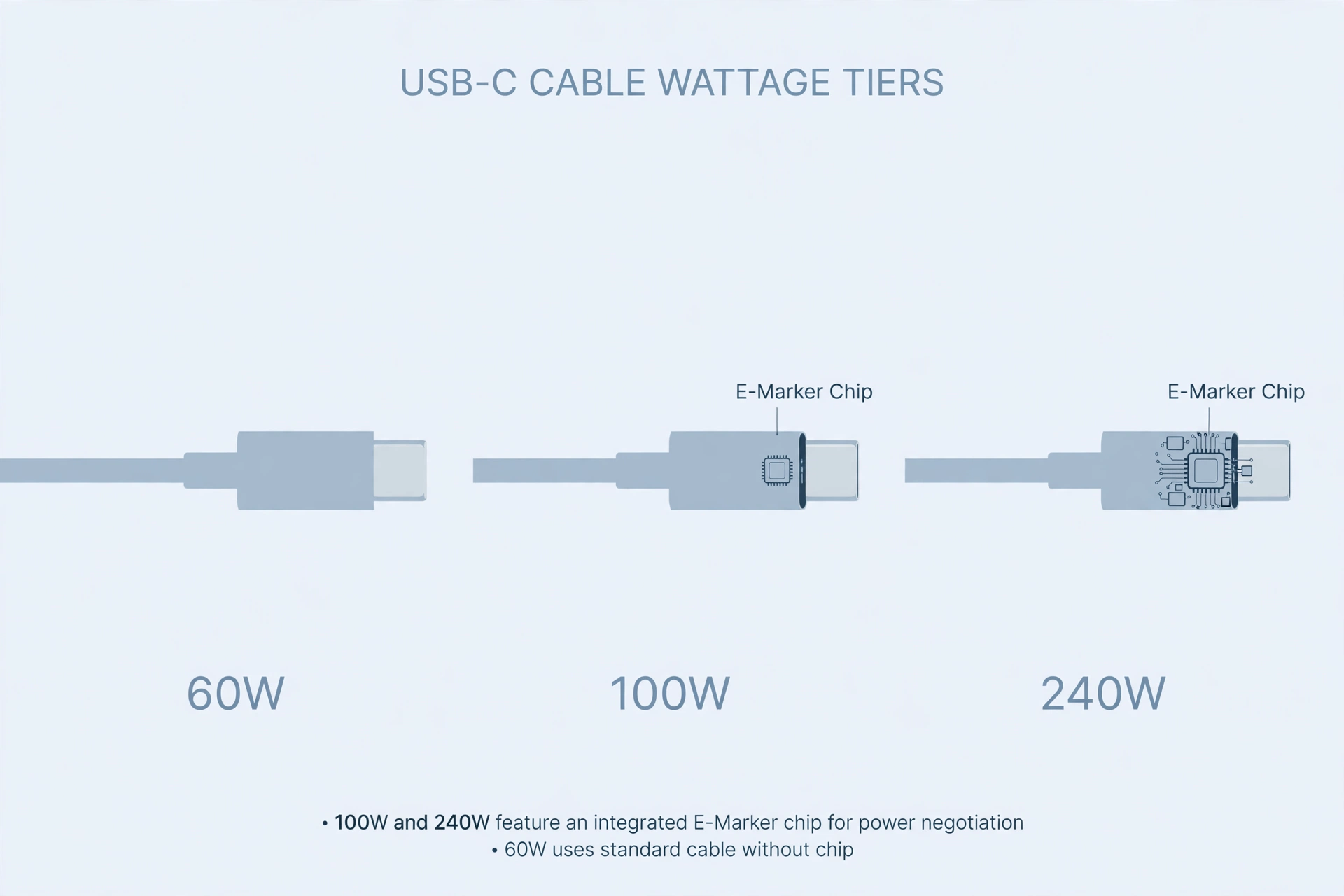
| 100W SPR | Up to 20V × 5A (100W) | Yes — 5A SPR e-marker | Most laptops, USB-C monitors |
| 240W EPR | 28V (140W), 36V (180W), 48V (240W) × 5A | Yes — 5A EPR e-marker | High-wattage laptops, 16-inch workstation laptops |
The gate is the e-marker: a small chip in the plug that tells the charger what the cable can handle. Standard cables are rated for 3A, which caps any charger at 60W until the cable is electronically marked for 5A. Without an e-marker, many chargers default to a safe 60W or even lower — you paid for 100W and you are getting 60W, with no warning, no notification, and no error message. A cable above 3A must contain an electronically marked assembly; the specification is direct about the rule.
Two things the wattage on the plug does not mean. First, the wattage printed on the plug is the cable’s maximum safe ceiling, not the power it forces into a device — a 240W cable will not push 240W into a phone. Second, every Power Delivery session starts at 5V and only steps up to 9V, 15V, 20V, 28V, 36V or 48V when the connected device explicitly requests it. The cable does not decide the voltage; it only has to survive it.
Check compatibility: one connector, many capabilities
A USB-C cable that charges your phone at 5W might look exactly the same as one rated for 240W and 80 Gbps. The connector gives you zero visual indication of what is inside. That is why cheap cables are more dangerous now than they were in the USB-A era: one connector now handles charging, data, video, audio and docking, so a bad cable can mean your laptop does not charge, your dock does not output video, your SSD runs at a fraction of its speed, or — in the worst case — voltage where it should not be.
Check three things against your devices. First, the wattage: read your laptop or phone’s manual for the wattage it requires, and buy a cable rated at or above it. Second, the data speed, if you move files or use a display: USB 2.0 gives 480 Mbps, USB 3.2 Gen 1 gives 5 Gbps, Gen 2 gives 10 Gbps, and USB4 gives up to 40 Gbps — and the length limits shrink as the speed rises: 4 metres at 480 Mbps, 2 metres at 5 Gbps, 1 metre at 10 and 20 Gbps, and 0.8 metres at 40 Gbps. Many 2-metre braided 240W charging cables wire only USB 2.0 data pins, so if you want one cable for both charging and an external display, choose a 240W cable that also specifies 20 Gbps, 40 Gbps, or Thunderbolt 4. Third, the length: longer cables can suffer voltage drop at high wattage, so buy the shortest cable that reaches.
Certified cables now carry a visible mark: every certified USB-C to USB-C cable carries a 60W or 240W logo, plus a data rate unless it is USB 2.0. EPR cables must be visibly marked with the EPR identification icons to be certified. If the listing shows no logo and names no wattage, treat the cable as unrated.
One more compatibility fact: since 28 December 2024, the EU common-charger rules apply to phones, tablets, cameras, headphones, portable speakers, handheld consoles, e-readers, keyboards, mice and navigation devices sold in the EU — they must charge through a USB-C receptacle, and anything charging above 5V, 3A or 15W must speak USB Power Delivery. That is why nearly every new device you buy now has a USB-C port, and why the cable matters more than the port.
Check safety: the cheap cable is the expensive one
This is not theoretical. Google engineer Benson Leung started testing Amazon USB-C cables in 2015 and found eight out of ten of the best-selling ones out of compliance with the USB-C standard — missing necessary electrical components or using the wrong ones. In 2016, his own Chromebook Pixel was rendered unbootable by a non-compliant cable: the cable was miswired, with the power and ground wires swapped, and used a 10 kΩ resistor instead of the 56 kΩ resistor the specification requires. Some cheap cables lack the pull-up resistors the specification mandates, which can let devices draw high levels of current and cause irreversible damage. Following Leung’s work, Amazon banned the sale of non-compliant USB-C cables.
The USB-IF, the standards body, has documented cases of non-certified cables sending 20V to devices expecting 5V. A bad cable can throttle your charger, corrupt a file transfer, or get warm enough during charging that you stop using it. The failure modes are silent: a cable that caps your 100W charger at 60W never tells you, and a cable that bottlenecks your external SSD to USB 2.0 speeds shows no error.
How to buy safely. First, buy certified cables: look for the USB-IF logo on the packaging, and check the official integrators list to confirm the certification is real. Second, match the e-marker to the job: above 60W you need a 5A e-marker cable, and above 100W you need an EPR cable. Third, inspect the build: reinforced strain relief at the connectors prevents fraying, and braided jackets resist tangling better than rubber. Fourth, retire a cable that gets warm during charging, that only charges when held at an angle, or that has a loose connector — those are the signs of a cable that has already failed inside.
Our USB-C hub buying guide covers the other end of the same setup — the ports, power and display compatibility of the hub the cable plugs into — and our UGREEN PD100W cable check shows what a single 100W cable listing actually states, and what it leaves out.
A short checklist before you buy
- Read your device’s required wattage, and buy a cable rated at or above it.
- Above 60W, confirm the cable has a 5A e-marker; above 100W, confirm it is an EPR cable with the visible marking.
- Check the data speed if you move files or use a display — and the length limit for that speed.
- Look for the USB-IF certification logo, and verify it on the official integrators list.
- Buy the shortest cable that reaches, with reinforced strain relief at the connectors.
- Retire any cable that gets warm, only charges at an angle, or has a loose connector.
FAQ
Will a 240W cable damage my phone?
No. The wattage on the plug is the cable’s maximum safe ceiling, not the power it forces into a device. Every Power Delivery session starts at 5V and only steps up when the device explicitly requests a higher voltage. A 240W cable is safe on a phone — it is simply more cable than the phone needs.
Why does my 100W charger only charge at 60W?
Most likely the cable. Standard cables are rated for 3A, which caps any charger at 60W until the cable is electronically marked for 5A. Without an e-marker, many chargers default to a safe 60W or lower, with no warning. Swap in a 5A e-marker cable and the charger can deliver its full rating — if the device asks for it.
Does cable length matter for charging?
Yes, at high wattage and high data speeds. Longer cables can suffer voltage drop above 100W, and the data-rate length limits shrink as speed rises: 4 metres at 480 Mbps, 2 metres at 5 Gbps, 1 metre at 10 and 20 Gbps, and 0.8 metres at 40 Gbps. Buy the shortest cable that reaches.
What does USB-IF certified actually mean?
It means the cable passed the USB Implementers Forum’s testing for safety, interoperability and performance, and carries the certification logo. Uncertified cables risk overheating and, in documented cases, have sent the wrong voltage to devices. The certification is the one check that does not depend on the seller’s word.
Sources
- SolderMag — Stop Buying Cheap USB-C Cables: What Actually Matters in 2026 (buy the cable for the job; e-marker and the 60W default; USB-IF documented 20V-to-5V cases; Benson Leung)
- RSQ — USB-C Cables: What 240W, 20Gbps and a 0.8 m Limit Actually Get You (ratings checked against USB-IF specifications: 3A standard cables, EPR voltages, length limits, certification logos, EU common-charger rules)
- Plugable — What Is 240W USB Extended Power Range (EPR) (PD 3.1 raised the ceiling from 100W to 240W; EPR cables must be visibly marked; original 5A cables deprecated)
- Wikipedia — Benson Leung (2016 Chromebook Pixel rendered unbootable by a miswired cable; missing pull-up resistors; Amazon banned non-compliant USB-C cables)
- WH2L Hub — USB-C 60W vs 100W vs 240W Cables & E-Marker Chips Guide (three power tiers; wattage is a ceiling, not forced power; every PD session starts at 5V)
LanPicks has not tested the cables discussed in this guide and names no best model. All figures above come from the sources listed, checked on 22 Nov 2026.
Related Posts

A replacement filter or brush listing is a claim, not evidence. The listing says “HEPA”, “OEM-quality”, or “lasts twice as long” — and none of those words can be checked from the listing page. This guide compares filters and brushes by evidence you can gather yourself: measure the old part, test the HEPA claim against […]

One rule decides whether a replacement part fits your robot vacuum: match the exact model number, not the name on the box. Two robots can share a name and take different filters, brushes, or dust bags, and a listing that names your series but not your exact model has not confirmed anything. This guide is […]

Three checks decide whether a small home appliance fits your home: the space it will actually work in, the voltage and frequency on its rating plate, and the plug and circuit it will run on. Skip any one of them and the appliance can arrive too tall for the shelf, rated for a different mains […]

Five accessory categories decide a travel creator kit: support, audio, light, power, and storage. Everything else is optional. The rule for packing is simple: every accessory you pack should solve a problem you will actually hit on your trip. A flexible tripod that steadies a shot on a rock earns its space; a second lens […]

Four checks decide a camera listing: the resolution, the autofocus, the stabilization, and the audio. In that order. Resolution tells you how much detail the camera records. Autofocus decides whether your subject stays sharp while you move. Stabilization decides whether walking footage is watchable. Audio decides whether anyone can understand you. A listing that states […]