

Linear vs Tactile vs Clicky Switches: How to Choose
A mechanical keyboard switch is the mechanism under each key. Most common mechanical switches fall into one of three feel families — linear, tactile, or clicky — and the family is about what a keypress feels like under your finger. Force and travel are a separate decision: two switches in the same family can press very differently. Silent switches are not a fourth family — silent is a design, with dampeners in the stem, that can be built into a linear or a tactile switch.
Short answer: pick by two things: how you want a keypress to feel, and where you type. If you want a press with no bump in the way, pick linear. If you want to feel a bump as you press, without a loud click, pick tactile. If you love an audible click and you type alone, pick clicky. This guide does not measure typing speed, and it does not rank families by speed — the choice here is feel and sound, and no family is quiet on its own: the keyboard around the switch matters as much as the switch.
How this guide was put together: LanPicks did not test switches hands-on for this article. Switch descriptions and specifications are based on the manufacturer’s published datasheets and comparison guides, cross-checked on 12 November 2026. Force figures are for the named CHERRY MX2A models only — other switches vary, so check the model you own. The hero image is an AI-generated editorial illustration, not a photo of a real product. Our editorial policy explains how we research and write guides.
In this guide

Quick Decision
Choose linear if you want a press with no bump in the way and you game or type for long sessions without wanting feedback under your fingers.
Choose tactile if you want to feel a bump as you press — a small rise in resistance partway down — without adding a click.
Choose clicky if you love the sound itself and you type in a room where nobody else can hear it.
Choose a silent switch instead if the room is the problem. Silent is a design with dampeners built into the stem, available in linear and tactile versions — not a property of the linear family.
What Each Switch Type Means
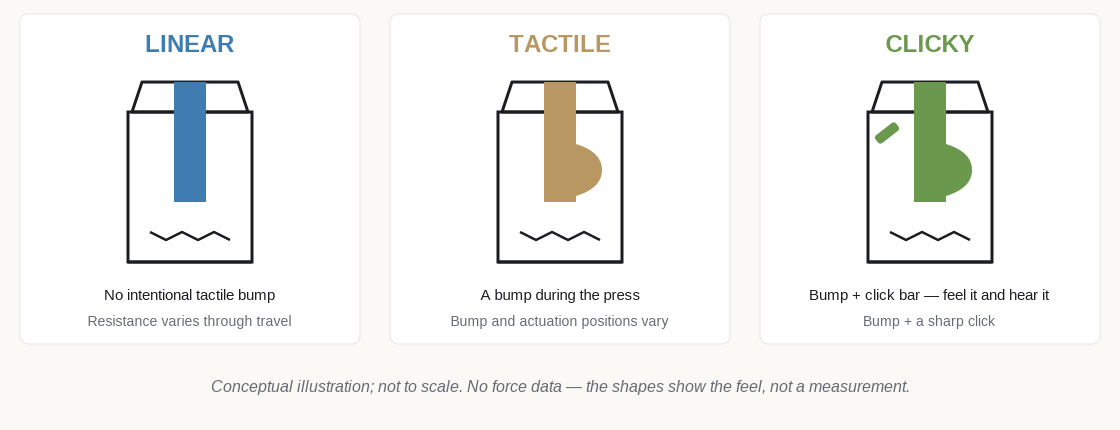
Linear. A linear switch moves straight down. The stem has no bump and no click mechanism, so the press has no intentional interruption. The force still rises as the spring compresses, and friction and the contact leaf vary by model — so one linear can feel heavier, scratchier or smoother than another. The key registers partway down; nothing in the feel marks that point.
Tactile. A tactile switch adds a bump partway through the press. The stem has a bulge that pushes past the switch’s contact leaf, so your finger feels a small rise in resistance, then a release, somewhere in the travel. The bump does not guarantee the key registers at the same point — the bump position, the actuation point and the reset point vary by model, so check the datasheet for the switch you own. The bump tells you where you are in the press; it does not promise the key has registered.
Clicky. A clicky switch is a tactile switch with a sound mechanism added — a click jacket or a click bar that snaps as you press through the bump. You feel the bump and hear a sharp click as the mechanism fires. CHERRY’s MX2A Blue is the classic example: tactile with an audible click, described by CHERRY as powerful and noticeable.
Feedback and Force
Force figures describe one model, not a family. The table below uses three named CHERRY MX2A switches — the standard examples for the three families — with the figures from CHERRY’s own datasheets. Do not read them as the values for every linear, tactile or clicky switch: other models vary, sometimes by a lot.
Swipe to compare all columns →
| Switch (CHERRY MX2A) | Type | Actuation force | Tactile / click peak | Pre-travel | Total travel |
|---|---|---|---|---|---|
| Red | Linear | 45 cN | — (no bump) | 2.0 mm | 4.0 mm |
| Brown | Tactile | 45 cN | 55 cN | 2.0 mm | 4.0 mm |
| Blue | Clicky | 50 cN | 60 cN | 2.2 mm | 4.0 mm |
Figures from CHERRY’s MX2A datasheets for the named models (Red MX2A-L1NN, Brown MX2A-G1NN, Blue MX2A-E1NA). Actuation force is the force where the key registers; the peak is the highest force at the bump or click point.
Why two numbers get quoted for the same switch: CHERRY’s own summary lines for these two models quote the peak force as the “operating force” — 55 cN for the Brown, 60 cN for the Blue. That is why many guides list the Brown as a 55 g switch and the Blue as a 60 g switch. Both figures are real, but they measure different points in the press: the key registers at 45 cN (Brown) and 50 cN (Blue), and the force peaks at the bump. Other makers may use “operating force” to mean something else, so read the sheet in front of you rather than assuming the term means the same everywhere. A few centinewtons on a spec sheet is not a decisive difference — the bump is.
The numbers do not travel across brands. A Brown from one maker is not the same weight as a Brown from another, and springs and tolerances vary, so read what “actuation force” means on the sheet in front of you before treating a few centinewtons as decisive. No switch color tells you the whole story: the same color name can hide different weights across brands.
What force does not tell you: it does not tell you how fast you will type, and this guide does not test speed — the choice here is feel and sound, decided by where you type. Input speed also depends on the keyboard’s controller, firmware, scan rate and polling, not the switch family, and comparing it needs measured data.
Why Keyboard Sound Is Not Just the Switch
The switch is one part of the sound. The board’s case, the mounting style, the plate, the keycaps, the stabilizers, and how hard you type all shape what a keypress sounds like. The same switch can sound different in two keyboards, and two switches can sound alike in the same keyboard.
That is why “linear is silent” is wrong. A linear switch has no click mechanism, but a keypress still makes sound — from the stem and housing as the key travels, from bottoming out, and from topping out on the way back up. You can also actuate a key without bottoming out, so bottoming out is not part of every keystroke. A tactile switch is not quiet by definition either: the bump is a feel, not a sound, but the switch still makes noise as it moves, bottoms out or tops out. Only clicky switches add a sound on purpose — a click mechanism that fires as you press — and even then the total noise depends on the model, the build, how hard you type and where the microphone sits.
Silent switches are a separate design. Switches sold as silent — CHERRY’s MX2A Silent Red, for example, which CHERRY lists as linear with quiet operation, and silent tactile versions exist too — have dampeners built into the stem that soften the impact at the ends of the travel. A silent switch makes the switch quieter; it does not guarantee the whole board is quiet — the case, plate and keycaps still contribute.
If you are on calls, the microphone hears the whole board, not the switch family. A clicky switch adds a deliberate click that a nearby microphone can pick up; a tactile or linear switch in a hollow board can carry too, depending on the build and where the microphone sits. Test the whole keyboard on a call, not the switch name.
Shared Spaces
Clicky switches deliberately add a click, which can be intrusive in shared spaces; total keyboard loudness still depends on the model and build. In a shared office, a thin-walled room, or a late-night household, the click carries. If anyone else can hear your keyboard, a clicky switch is a choice you make for yourself and everyone else hears.
Tactile and linear switches are one answer for shared spaces, but “one answer” is not a guarantee: a loud bottom-out in a hollow case can still carry. If you share the room, the practical test is simple — type the way you normally type and ask the person nearest you.
A note on offices: a tactile switch gives you feedback without a click, which suits typing at work for many people. But if your work is mostly calls, the switch matters less than the board — and a silent switch (linear or tactile) is the safer pick.
Gaming and Typing Preferences
For gaming, a light linear gives a press with no bump in the way, and repeated presses feel the same. That is a preference, not a performance claim — this guide does not measure speed, and a switch’s color does not set input speed or latency. Latency depends on the keyboard’s controller, firmware, scan rate and polling, and comparing it needs measured data.
For typing and coding, a tactile switch gives your fingers a bump in the travel without a click, which suits long sessions for many typists. Some typists prefer linear for the same work — the smoothness suits fast, light typing — and some prefer clicky for the rhythm. All three are legitimate; the difference is what your fingers want to feel.
For mixed use — a keyboard that games at night and types documents by day — a light or medium tactile is one compromise: feedback for typing, no click for the household. But a compromise is still a preference, and the only way to know is to try the feel.
Which Switch Fits You
Match your own use to the row that sounds most like you. If two rows pull in opposite directions, the one about the room you type in should win over the one about the feel you like — a switch your household cannot live with costs more than a bump you enjoy.
Swipe to compare all columns →
| Your setup | Pick | Why |
|---|---|---|
| Game most of the time and want a press with no bump in the way | Linear | No bump in the way; repeated presses feel the same |
| Type or code all day and want to feel each key press | Tactile | A bump in the travel gives feedback under your finger, without a click |
| Love the click sound and type alone | Clicky | Bump plus an audible click as the mechanism fires — your room, your sound |
| Share a room or an office and need to keep it down | Silent switch (separate design) | Dampeners soften the impact at the ends of the travel; a standard linear or tactile does not guarantee quiet |
| On voice calls most of the day | Silent linear or silent tactile | No click to carry over the microphone — and test the whole board, not just the switch |
| Want one keyboard for typing and gaming | Light / medium tactile | Feedback for typing, no click for the household |
| Cannot decide between two families | Hot-swap board + switch tester | Try the feel before committing; the switch is not permanent on a hot-swap board — check the socket and pins match before you buy switches |
Try Before Committing
One way to choose is a switch tester — a small board with one of each family — or a hot-swap keyboard, where the switches pull out and swap without soldering. A tester only shows you the feel of each switch on its own: it does not reproduce the sound or the feel of a full keyboard, so treat it as an impression, not a verdict. And hot-swap does not mean every switch fits every board — check the socket, the stem, and the pin layout (3-pin or 5-pin), and whether the board takes MX-style, low-profile, optical or magnetic switches, per the manufacturer’s specification. A switch that does not match the socket will not fit, whatever family it belongs to.
If you buy a whole keyboard first, buy the family you are most likely to keep, and check the return policy before ordering a switch type you have never typed on.
Layout is a separate choice from switches. If you have not picked a layout yet, our 75% vs TKL guide compares the two compact layouts in detail, and our mechanical keyboard sizes guide covers 60% to full-size.
FAQ
Is a linear switch really silent? No. A linear switch has no click mechanism, but the keypress still makes sound — from the stem and housing as it travels, from bottoming out, and from topping out. Silent switches are a separate design with dampeners built into the stem, and they make the switch quieter without guaranteeing a quiet board.
Is tactile quieter than clicky? The bump is a feel, not a sound — but the switch still makes noise as it moves, bottoms out or tops out, and how loud that is depends on the board. A clicky switch adds a deliberate click on top of that, so it adds sound by design; how much louder the whole keyboard is depends on the model, the build and how you type.
Do linear switches make you type or game faster? This guide does not measure typing speed and makes no speed claim for any family. The choice here is feel and sound; input speed depends on the keyboard’s controller and polling, not the switch family.
What does 45 cN mean on a spec sheet? It is the force at the point the key registers for that named model. A centinewton is a unit of force, not mass: 45 cN is about 45.9 gram-force (gf) if you convert it, but the datasheet states cN, so this guide keeps cN. For a tactile switch, the force peaks higher at the bump — 55 cN for the CHERRY MX2A Brown — which is why you will see both 45 and 55 quoted for the same switch.
Can I change switches later? On a hot-swap board, yes: the switches pull out without soldering. On a soldered board, changing switches means desoldering, so pick the family first.
Which switch should a first mechanical keyboard have? A light or medium tactile is one starting point: feedback without a click, and it suits both typing and gaming. But it is a preference — if you know you want presses with no bump, start linear.
Conclusion
Linear, tactile and clicky are three feels, not three performance tiers. Pick the feel your fingers want and the sound your room allows, check the named model’s own datasheet for the numbers, and try the switches before you commit if you can. The switch is one part of the keyboard — the board, the layout and the keycaps finish the job.
Once you have picked a switch family, choose the layout it will live in: our mechanical keyboard sizes guide compares 60% to full-size.
Sources
- CHERRY. “CHERRY MX2A Red.” https://www.cherry.de/en-us/product/mx2a-red
- CHERRY. “CHERRY MX2A Brown.” https://www.cherry.de/en-us/product/mx2a-brown
- CHERRY. “Datasheet CHERRY MX2A-L1NN KS MX” (Red). https://cherry.saas.contentserv.com/admin/rest/document/59?ContextIDs=22938&Language=1
- CHERRY. “Datasheet CHERRY MX2A-G1NN KS MX” (Brown). https://cherry.saas.contentserv.com/admin/rest/document/59?ContextIDs=22924&Language=1
- CHERRY. “Datasheet CHERRY MX2A-E1NA KS MX RGB” (Blue). https://cherry.saas.contentserv.com/admin/rest/document/59?ContextIDs=22893&Language=1
- Mechanical Keyboard Co. “Tactile vs Linear vs Clicky Switches: The First-Buyer’s Guide (2026).” https://www.mechanicalkeyboard.co/blog/tactile-vs-linear-vs-clicky-switches.html
- The Setup Loft. “Keyboard switches: linear vs tactile vs clicky, no elitism.” https://www.thesetuploft.com/articles/mechanical-keyboard-switches-linear-tactile-clicky/
- SlashSkill. “Mechanical Keyboard Switches Explained: Linear vs Tactile vs Clicky (and Which to Pick).” https://www.slashskill.com/mechanical-keyboard-switches-explained-linear-vs-tactile-vs-clicky/
- Keyboard Lab. “Linear vs Tactile vs Clicky Switches — The Honest Guide.” https://keyboard-lab.pages.dev/linear-vs-tactile-vs-clicky-switches/
- Keyboard Simulators. “Red vs Brown vs Blue Switches: Which One Should You Get?” https://www.keyboardsimulators.com/learn/red-vs-brown-vs-blue-switches
Dimensions and force figures cross-checked against the sources above on 12 November 2026. Force figures are for the named CHERRY MX2A models only — other switches vary.
Related Posts
This is a keycap set only: black keycaps, no keyboard and no switches. It is worth buying only if your board takes MX-style stems, uses an ANSI layout, and matches the key widths and rows in the set. Keychron describes the set as a full set of 141 keys; the AliExpress listing does not confirm […]

A gaming mouse that fits your hand disappears during play; one that does not keeps reminding you it is there. Fit comes down to two numbers — your hand length and width — and one habit — your grip. Measure both, compare them against the maker’s published dimensions, and use the starting ranges in this […]

AI-generated editorial illustration; not an exact product depiction. Quick Decision Pick a 2.4 GHz wireless mouse if you want no cable and play on a PC with a free USB port for the receiver. Pick wired if you never want to think about charging, or you are shopping on a tight budget. Use Bluetooth mainly […]

Both the 75% and the TKL drop the number pad, and both keep a function row and dedicated arrow keys. But they do not keep the same keys in the same way: a 75% usually keeps fewer dedicated navigation keys than a TKL, and how many it keeps — and where they sit — varies […]
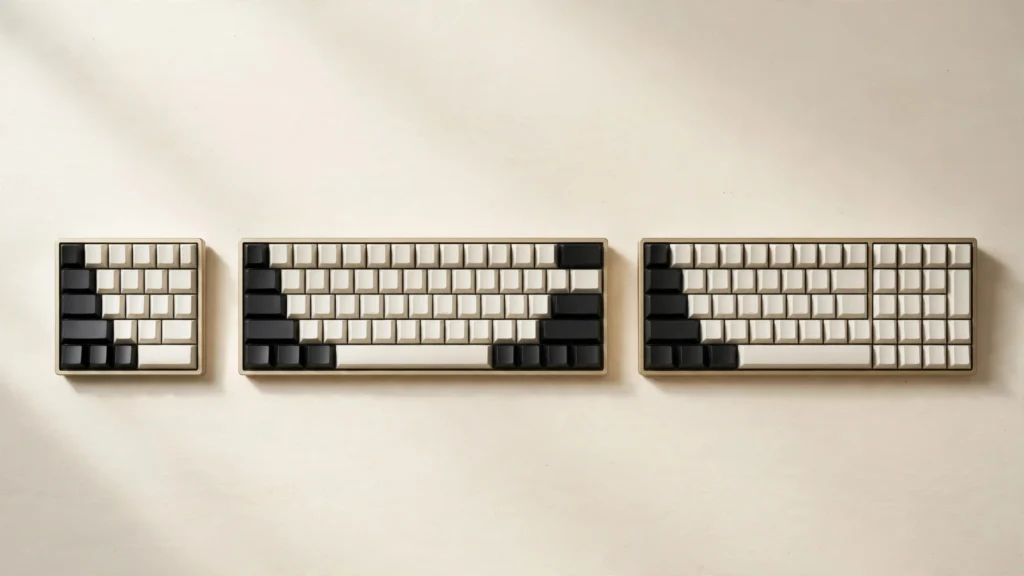
Shopping for a mechanical keyboard starts with a confusing wall of labels: 60%, 65%, 75%, TKL, full-size. They look like precise measurements, but they are not. They are rough shorthand for how many keys a layout keeps compared with a standard full-size board — and, more usefully, which groups of keys you give up. Short […]