

Budget Wireless Earbuds: Fit, Codecs, Microphone and Battery — What to Check Before You Buy
Four checks decide a budget wireless earbud: the fit, the codec matched to your phone, the microphone, and the battery claim. In that order. Fit comes first because a bad seal makes the same earbuds sound thin, isolates less, and makes noise cancelling work harder — no spec sheet measures fit, and it is the single most important factor in whether you will actually use the earbuds daily. A codec only matters if both your phone and the earbuds support it. A microphone only matters if the person on the other end can hear you. And a battery claim only matters if you know how it was measured. Get those four right and a budget pair can be genuinely good; get them wrong and no brand name or feature list saves it.
Budget here means the value tier, not the cheapest listing. SolderMag puts the value sweet spot at $50–100, where quality jumps significantly over sub-$50 pairs — real noise cancelling, decent sound, 6–8 hour battery and usable call quality — while the $100–200 tier adds polish rather than a different class of sound. Prices vary by market and over time, so treat those bands as a framework, not a price list. This guide names no best earbuds and ranks nothing. It tells you how to check the four things that matter, with the sources named.
Check the fit first
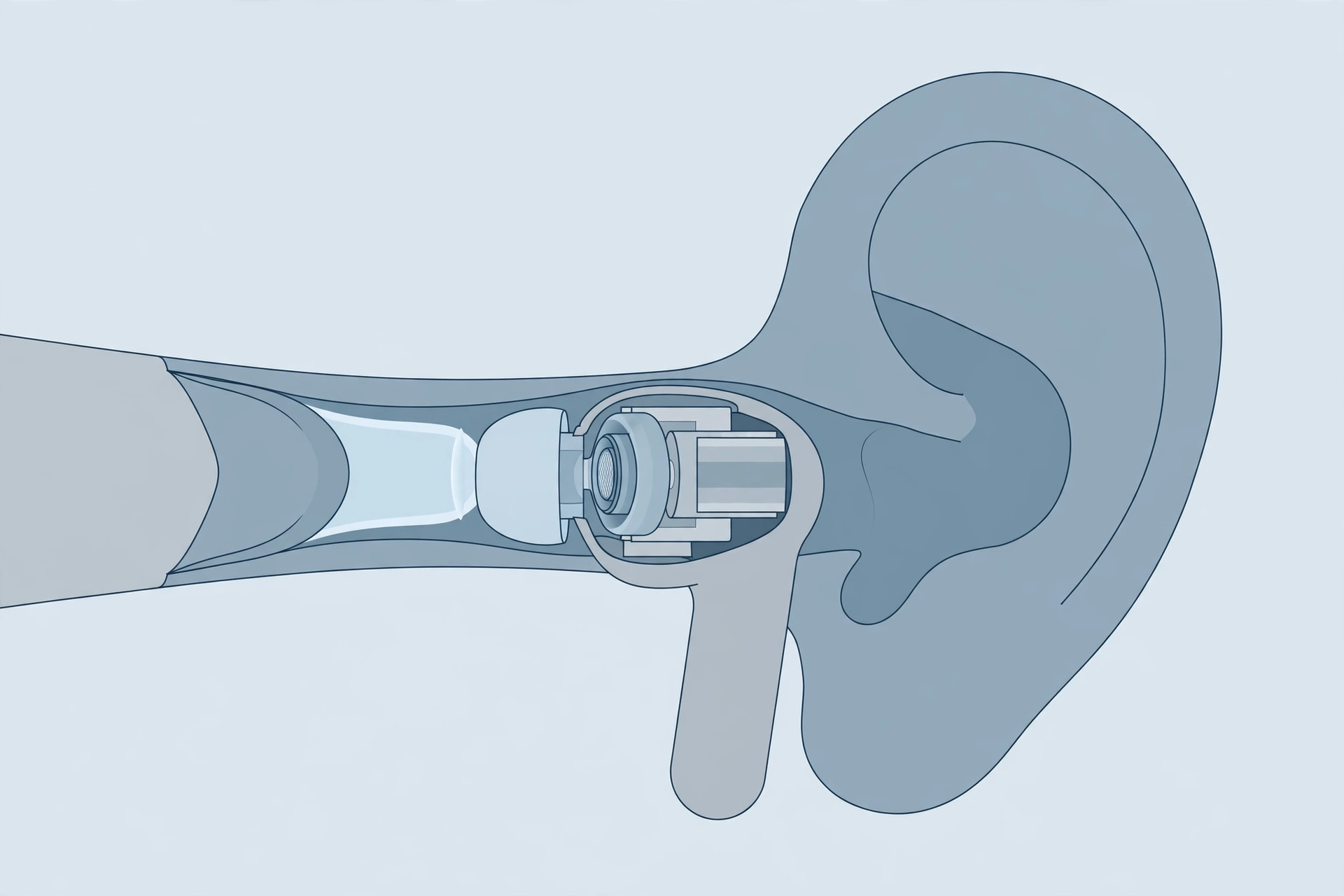
An in-ear earbud works by sealing your ear canal. When the tip fits well, the earbud, the tip and the canal form a controlled path for sound; when there is a gap, bass pressure leaks out before it can build up, so the same earbuds sound thin and bass-starved even though nothing changed in the electronics. A good seal also blocks outside sound passively, which is what makes noise cancelling effective — earbuds that do not seal make the cancelling work overtime. Android Authority’s fit tests show the same pattern: a poor fit on a head-and-torso simulator produced a relatively quiet bass output, and refitting the same buds improved the bass and midrange response.
Start with the ear tips. Every pair ships with three or four sizes of silicone tips, usually S, M and L, sometimes XS. The right size creates an airtight seal. Test it the way SolderMag describes: insert the earbud, open your mouth, and move your jaw side to side. If the seal breaks or the earbud shifts, try the next size up. Most people need different sizes for each ear. If silicone irritates you over time, look for pairs that support memory foam tips — foam conforms to the canal, improves the seal, and is generally more comfortable for sensitive ears.
For workouts and running, fit security matters more than sound. Rubber fins or wings hook into the ridge of the outer ear and keep the buds in place; Android Authority’s reviewer found winged earbuds far more stable than wingless ones, though the wings can cost some comfort over long sessions. If the earbuds do not come with fins and you plan to exercise in them, that is a dealbreaker for gym use.
Two more fit facts to check. First, earbuds range from about 5g to 8g per earbud, and the difference compounds over hours — if you plan to wear them for four or more hours daily, test comfort for at least 30 minutes before committing. Second, some earbuds come with an ear tip fit test in their app; if yours do not, use the guess-and-check method above.
Check the codec against your phone
A Bluetooth codec compresses audio to fit the wireless link. The higher the bitrate, the more of the original audio survives — but only if both ends support the codec. Qualcomm says aptX support is needed in the Bluetooth audio chipsets at both the transmitting and receiving ends, and the same rule applies to every codec: a pair that supports LDAC is wasted on a phone that does not.
| Codec | Max bitrate | Platform |
|---|---|---|
| SBC | 345 kbps | Universal baseline |
| AAC | 256 kbps | iOS default |
| aptX | 384 kbps | Android |
| aptX Adaptive | up to 420 kbps | Android |
| LDAC | up to 990 kbps | Android |
| aptX Lossless | 1200 kbps | Android |
| LC3 / LE Audio | Varies | Bluetooth 5.2+ |
Those figures are SolderMag’s codec table. The two that matter most for budget buyers are attributed to the manufacturers themselves: Sony lists LDAC’s best-effort steps as 330, 660 and 990 kbps — 990 kbps is the maximum listed rate, and the connection drops to a lower step when the radio environment gets congested — while Qualcomm lists aptX Adaptive’s typical bitrate as 279–420 kbps, adjusting to connection conditions. These are manufacturer specifications, not the results of a head-to-head test.
Before you pay for a high-bitrate codec, check what you actually listen to. If you stream Spotify at 160 kbps on your commute, the codec does not matter — AAC is fine. If you listen to FLAC files or a lossless streaming tier through a recent Android phone, aptX Adaptive or LDAC makes an audible difference. iPhone users are locked to AAC regardless, so codec support is irrelevant on iOS — spend the money on fit and comfort instead.
Driver size is a weaker signal than the codec. Most earbuds use dynamic drivers between 6mm and 12mm, and a well-tuned 7mm driver can outperform a poorly tuned 12mm one. Do not buy on driver size alone.
Check the microphone before you trust call claims
Earbud call quality varies dramatically and is almost never mentioned in spec sheets. What to look for: multiple microphones per earbud — three or more is good for call quality — beamforming software that directs pickup toward your mouth, bone conduction sensors that detect your voice through jaw vibration, and wind noise reduction if you walk during calls.
Shape matters too. Stemmed earbuds place the microphones closer to your mouth, improving call quality, and they are easier to handle than standard earbuds. That is one reason the stem design is so common.
Test the microphone the only reliable way: call someone from a coffee shop or a busy street and ask them to rate your clarity. Marketing claims about “crystal clear calls” are meaningless. If calls are your main use, start from that test, not from the feature list. Our guide to wireless earbuds for travel and calls applies the same check to the travel case.
Read battery claims the way testers do
Manufacturer battery claims are measured with noise cancelling off, volume at 50%, and no calls. Real-world battery life runs 15–25% lower. SolderMag’s claimed-versus-real table makes the gap concrete: a claimed 6 hours becomes about 4.5–5 hours in mixed use with noise cancelling on; a claimed 8 hours becomes about 6–6.5 hours; a claimed 10 hours becomes about 7.5–8 hours.
Independent tests give a second anchor. SoundGuys’ battery tests average about 6.4 hours per charge across the earbuds it has measured — a category average, not a figure for any one model. Use it to sanity-check a claim: a budget pair claiming 12 hours per charge with noise cancelling on is claiming roughly double the measured average, and deserves a closer look at the test conditions.
What matters more than per-charge time is total battery with the case. A case that holds three or four full charges gives you 20–30 hours total, which is enough for a full work week without plugging in. Quick charge — 10–15 minutes for one to two hours of playback — is more useful than it sounds, because it saves you when you forget to charge overnight. And if the listing claims a battery figure, check whether it is per charge or with the case: the two numbers describe different things, and listings mix them up. Our Lenovo GM2 Pro check shows a listing that states both “up to 30 hours” and “up to 5 hours” for the same pair — the 30-hour figure is the total with the case, the 5-hour figure is per charge — and our Lenovo LP40 Pro check shows the same per-charge versus total distinction.
What a budget pair should and should not promise
Water resistance is worth checking. For workouts, IPX4 is the minimum for sweat resistance. The IP rating’s second digit describes water protection — higher numbers cover more, from splashes up to immersion — and the exact meanings are explained in Anker’s waterproof-ratings guide.
Two features are worth paying for. Multipoint Bluetooth connects to your phone and laptop at the same time and saves constant re-pairing — essential for work use. App-based EQ lets you adjust the tuning yourself, which matters more than the factory tuning on a budget pair.
Three claims are marketing noise. “360 spatial audio” is gimmicky for music. “AI-powered ANC” is not a buying factor — every noise-cancelling algorithm uses signal processing, and calling it AI does not make it better. And a “Hi-Res Audio Certified” logo is not a guarantee of quality: it means nothing without the right source and codec chain. The best noise-cancelling earbuds reduce ambient noise by roughly 25–30 dB, which is meaningful but not silence — if you need maximum isolation, over-ear headphones are still the better tool.
A short checklist before you buy
- Try every tip size in the box, and the jaw test, before you decide the pair fits.
- Confirm the codec your phone supports, and match the earbuds to it — not the other way round.
- Call someone from a noisy place and ask them to rate your clarity.
- Read the battery claim as per-charge versus with-case, and discount it 15–25% for real use.
- Check the IP rating if you will exercise in them — IPX4 minimum for sweat.
- Skip the pair if the listing cannot state its codec, its per-charge battery, or its tip sizes.
FAQ
Do codecs matter on iPhone?
No. iPhone users are locked to AAC regardless of what the earbuds support, so codec support is irrelevant on iOS. Spend the money on fit, comfort and microphone quality instead.
How long should budget earbuds last per charge?
SoundGuys’ independent battery tests average about 6.4 hours per charge across the earbuds it has measured — a category average, not a figure for any one model. Manufacturer claims are measured with noise cancelling off, volume at 50% and no calls, so expect 15–25% less in real use. What matters more is the total with the case: three or four full charges gives you 20–30 hours before you need a plug.
Do I need ANC on a budget pair?
Only if your main use is commuting or travel. The best noise-cancelling earbuds reduce ambient noise by roughly 25–30 dB — meaningful, but not silence — and earbud ANC depends heavily on the seal of the ear tip. If you mostly listen at home, spend the money on fit and sound instead.
Are foam tips better than silicone?
Foam tips conform to the ear canal, improve the seal, and are generally more comfortable for sensitive ears — but they wear out faster and are harder to clean than silicone. Silicone is durable and easy to wipe down. Try both if the pair supports them; the right choice is the one that seals your ear without aching after an hour.
Sources
- SoundGuys — How long should your earbuds last? (independent battery tests average about 6.4 hours per charge)
- Anker — Understanding Waterproof Ratings for Earbuds (what the IP rating digits mean)
- Android Authority — How earbuds fit can make or break your listening experience (wing tips and stability; fit, seal and bass; stemmed earbuds and microphone placement)
- SolderMag — How to Choose True Wireless Earbuds: A No-Nonsense Buyer’s Guide (codec table; battery claims and real-world shortfall; microphone checks; price tiers; ANC limits; features worth paying for)
- UMA Technology — LDAC vs. aptX Adaptive: Bitrate, Latency and Compatibility (Sony lists LDAC at 330/660/990 kbps; Qualcomm lists aptX Adaptive at 279–420 kbps; both ends need codec support)
LanPicks has not tested the earbuds discussed in this guide and names no best model. All figures above come from the sources listed, checked on 22 Nov 2026.
Related Posts

A replacement filter or brush listing is a claim, not evidence. The listing says “HEPA”, “OEM-quality”, or “lasts twice as long” — and none of those words can be checked from the listing page. This guide compares filters and brushes by evidence you can gather yourself: measure the old part, test the HEPA claim against […]

One rule decides whether a replacement part fits your robot vacuum: match the exact model number, not the name on the box. Two robots can share a name and take different filters, brushes, or dust bags, and a listing that names your series but not your exact model has not confirmed anything. This guide is […]

Three checks decide whether a small home appliance fits your home: the space it will actually work in, the voltage and frequency on its rating plate, and the plug and circuit it will run on. Skip any one of them and the appliance can arrive too tall for the shelf, rated for a different mains […]

Five accessory categories decide a travel creator kit: support, audio, light, power, and storage. Everything else is optional. The rule for packing is simple: every accessory you pack should solve a problem you will actually hit on your trip. A flexible tripod that steadies a shot on a rock earns its space; a second lens […]
Four checks decide a camera listing: the resolution, the autofocus, the stabilization, and the audio. In that order. Resolution tells you how much detail the camera records. Autofocus decides whether your subject stays sharp while you move. Stabilization decides whether walking footage is watchable. Audio decides whether anyone can understand you. A listing that states […]